IPTV has quietly become the way millions of households watch television — but plenty of people still ask the obvious first question: what is IPTV, exactly? If you have heard about streaming boxes, Fire Sticks, 4K channels, or services promising tens of thousands of live channels, this guide is for you. We will explain what IPTV is, how it actually works under the hood, how it differs from cable and satellite, what you need to start watching, and how to judge whether a provider is trustworthy — all without the marketing fluff.
What Is IPTV? The Simple Definition
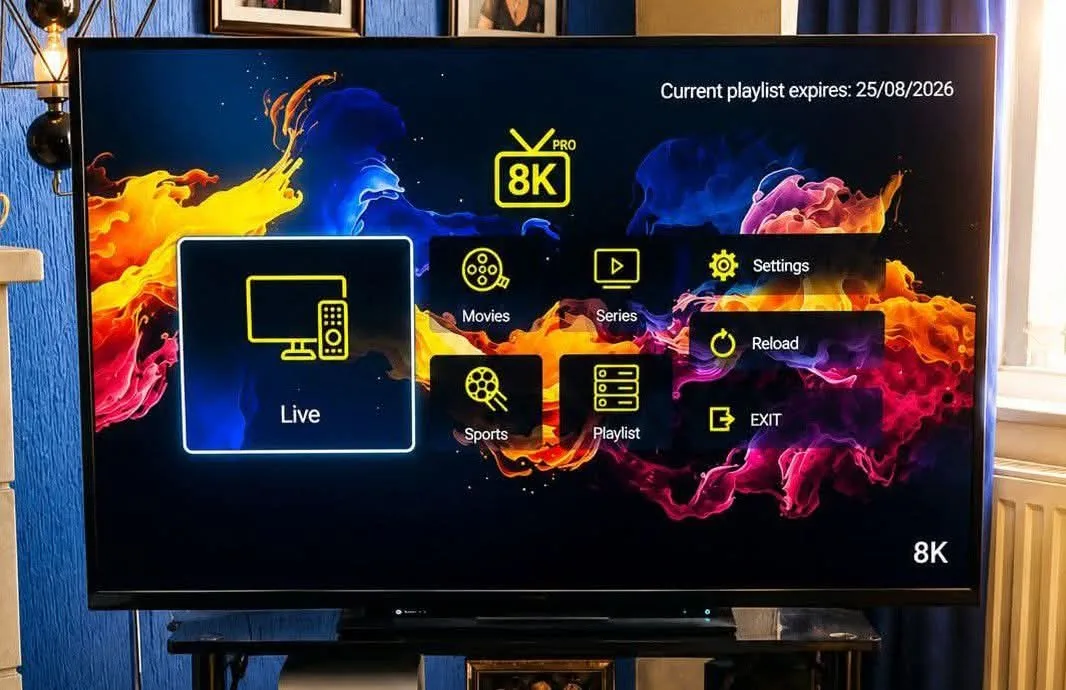
IPTV stands for Internet Protocol Television. In plain English, it is television delivered over an internet connection instead of through a cable wire, a satellite dish, or an over-the-air antenna. When you watch IPTV, your TV (through a set-top box, a smart TV app, or a media device like an Amazon Fire Stick) connects to servers on the internet, pulls down live channels and on-demand movies in real time, and decodes them into a normal video feed on your screen.
The "IP" part is the key. Just as every website lives at a specific address on the internet, every IPTV stream lives at an address too. The service you subscribe to gives your device a playlist — really just a long list of channel addresses — and your player fetches each channel stream on demand. Nothing is broadcast from a tower to your rooftop; everything travels through your broadband or fiber connection.
A modern premium IPTV service provider packages this into a subscription: thousands of live channels from dozens of countries, hundreds of thousands of movies and TV series on demand, video-on-demand libraries with full seasons, electronic program guides (EPG) that show schedules like an old TV guide, and apps for nearly every device you own — smart TVs, phones, tablets, computers, Android boxes, and streaming sticks.
How Does IPTV Actually Work?
Under the hood, IPTV is a chain of steps that happens every time you press play. Understanding this chain helps you understand why quality varies so much between providers — and why buffering happens when a link in the chain is weak.
Step 1: The Content Gets Encoded
First, the television signal — whether it comes from a broadcast partner, a satellite feed, or an IP camera — is converted into a digital video stream. This process is called encoding. The stream is compressed using modern codecs such as H.264, HEVC (H.265), or AV1 so that a 4K channel can travel over a home internet connection without requiring gigabits of bandwidth. High-bitrate 4K streams typically need 20–25 Mbps of stable bandwidth, while 1080p channels usually need 5–8 Mbps.
Step 2: The Stream Is Hosted on Servers
Next, providers push those encoded streams onto distributed media servers in data centers around the world. Serious providers use load balancers and multiple points of presence so that if a server in one region is overloaded, your device can fall back to another. Cheap providers skip this step, which is exactly why their streams are unstable during big sports events — thousands of viewers hit the same weak server at once.
Step 3: Your Device Pulls the Stream
When you open an IPTV app such as Iptv Smarters, TiviMate, IBO Player, or Flix IPTV, you sign in with the credentials your provider gave you. The app downloads a playlist (usually in M3U format) plus an EPG guide file. Every channel in that playlist is a URL; pressing a channel means your device starts fetching that URL as a live, continuous stream.
Step 4: Buffering Makes It Smooth
Your player keeps a few seconds of video in memory — the "buffer" — so that tiny network hiccups do not cause freezes. If your internet speed drops below the stream's bitrate for longer than the buffer can cover, you see the spinning circle or a pixelated picture. This is why a wired Ethernet connection or a strong 5 GHz Wi-Fi signal makes a dramatic difference on IPTV. If buffering is already your enemy, our dedicated anti-buffering guide fixes 90% of cases in minutes.
Step 5: You Navigate, Pause, and On-Demand
On top of live channels, modern IPTV includes catch-up TV (replay of shows from the last few days), pause/rewind on supported players, and video-on-demand (VOD) libraries. VOD works like Netflix inside the same app: you browse titles, press play, and a file served from a CDN streams to you. The scale is remarkable — Lion IPTV, for instance, offers more than 44,000 live channels and over 320,000 movies and series in its on-demand library.
IPTV vs Cable vs Satellite: What Is the Real Difference?
Because all three deliver television, people often lump them together. The differences matter, though — in price, flexibility, and features.
Delivery Method
Cable TV sends its signal through physical coaxial or fiber cables installed by your local operator. Satellite TV beams the signal from space to a dish on your house. IPTV sends everything through your existing internet connection — no new wiring, no dish, no local operator needed. If you have broadband, you have the "installation" already.
Channel Flexibility
Cable and satellite packages are built for one country. If you move abroad and want your home channels — or you want international sports, Arabic channels, European cinema, or Asian entertainment — cable simply cannot deliver it. IPTV providers aggregate channels from many countries in one subscription, which is a major reason people switch.
Price
A typical cable bundle in the US costs $60–$120 per month, often with equipment rental fees and regional sports surcharges. Satellite looks similar. A good IPTV subscription is a fraction of that — commonly $10–$20 per month for a full multi-country package, with 4K support included on quality tiers. Over a year, the savings usually pay for the streaming device several times over.
Devices and Screens
With cable you watch on TVs connected to the operator's box. With satellite, same story plus the dish. With IPTV, one subscription can often serve several devices — the best providers allow 1 to 4 simultaneous connections so the family can watch sports in the living room, cartoons on a tablet, and movies in the bedroom at the same time.
Features That Cable Never Had
Catch-up TV across thousands of channels, multi-day pause windows, picture-in-picture, favorites organized by category, instant on-demand access to decades of movies, and the ability to take your subscription with you when traveling — these are native IPTV features, not add-ons.

What Do You Need to Start Watching IPTV?
Starting is easier than most people expect. Here is the complete checklist:
1. A Stable Internet Connection
Plan for the content you want to watch, not the marketing number your ISP sells you. Practical minimums: 10 Mbps for reliable 1080p, 25 Mbps for 4K channels, and add headroom if other people in the house are streaming at the same time. Fibre is ideal; stable cable broadband is fine. Satellite mobile internet can struggle because of latency spikes.
2. A Streaming Device (or a Smart TV App)
The most popular devices are Amazon Fire TV products, which are cheap, fast, and have mature IPTV apps available. Android TV boxes, Chromecast with Google TV, Apple TV (via players like Flix IPTV or GSE Smart IPTV), Samsung and LG smart TVs (via SmartIPTV or Iptv Smarters Pro), phones and tablets, and even Windows and Mac computers through VLC or.Smarters-style apps. You only need one device per TV or person at a time.
3. An IPTV App
The app is your channel browser and player. The main options at the time of writing are Iptv Smarters Pro (free and extremely popular on Fire Stick — see our full install guide), TiviMate (widely considered the best premium player on Android/Fire TV because of its guide design and multi-view), IBO Player (a paid activation app popular on smart TVs), and GSE Smart IPTV on iOS.
4. An Activated Subscription
Finally, you purchase a subscription from an IPTV provider. You receive an M3U playlist and/or Xtream Codes login, plus typically an activation email. You enter those credentials in the app, the channel list loads, and you are watching within minutes. Reputable providers — like Lion IPTV — offer a free 24-hour trial so you can test everything, including 4K quality and the on-demand library, before you pay a cent.
Want to Test IPTV on Your TV Today?
Getting your free trial from a genuine provider takes under 5 minutes. Lion IPTV gives you a 24-hour full-access pass — 44,573 live channels, 320,000+ movies & series in 4K — no credit card, no commitment. Ask us anything on WhatsApp while you test.
Types of IPTV Services (and How to Avoid the Bad Ones)
The phrase "IPTV service" is applied loosely to everything from billion-dollar platforms like YouTube TV to anonymous resellers on social media. Knowing the categories protects your wallet and your data.
Legal, Big-Brand Streaming (Sling TV, YouTube TV, DirecTV Stream)
These are fully licensed services signed contracts with broadcasters. They are legal everywhere, but channel counts are limited to their licensed rights — which is why international viewers often find them incomplete and expensive.
Large Independent IPTV "Aggregators"
This tier — where most subscription-seeking customers actually shop — offers tens of thousands of channels and VOD at aggressive prices. Quality varies dramatically, from professionally run services with monitored servers and anti-freeze technology to fly-by-night resellers who copy someone else's feed. Before you subscribe anywhere, check: server infrastructure claims, trial availability, support responsiveness (test WhatsApp response time before buying), refund policy, and real customer reviews.
Illegal and Unsafe Offers
Handle with care: services that operate no support, sell "lifetime" access for $5, or have cloned websites exist only to take your money and vanish. More importantly, distributing copyrighted content without licenses is illegal in most countries, and end users can face account bans, ISP warnings, or worse depending on jurisdiction. Always verify what you are subscribing to and the licensing posture of the provider. A premium IPTV service provider that communicates openly about content areas, support, and infrastructure is a safer bet than a $5 hustler with zero support channels.

Common IPTV Questions (Answered Honestly)
Is IPTV the same as Netflix?
No, but they overlap. Netflix is pure video-on-demand — you pick from its catalog. IPTV adds live television (sports, news, live events) alongside an enormous on-demand library. A good IPTV subscription effectively gives you the live-TV experience of cable plus a VOD library comparable to standalone streaming services, in one app.
Do I need a VPN for IPTV?
Not always. A VPN can help if your ISP throttles video traffic, if you want to appear in a different region for licensing reasons, or if you want an extra privacy layer. For raw speed, know that some VPN routes add latency; if you use one, pick a server near your physical location. Providers themselves generally do not block VPNs.
How many devices can I use at once?
Depends on your plan. Most quality providers sell connections in tiers: typically 1 device on the base plan and up to 4 with the top tier. Note that "4 connections" means 4 simultaneous streams, not 4 TVs limit total — one subscription can serve four screens at the same moment.
Will IPTV work on my old TV?
If it has an HDMI port, yes — plug in a Fire Stick, Android box, or any streaming device. If your TV is pre-HDMI (very old CRT or early plasma), you will need an HDMI-to-composite adapter, which works but limits maximum resolution.
What internet speed do I really need?
For a household where one person watches 4K and others browse the web, 50–100 Mbps is comfortable. For a 4-connection family plan streaming 4K sports in three rooms simultaneously, aim higher and use wired Ethernet or strong mesh Wi-Fi on the TVs themselves.
Can I record shows?
Advanced players like TiviMate Premium support local recording onto a USB drive or internal storage on supported Android devices. Catch-up TV covers most "I missed it yesterday" cases without recording at all.
Why 4K Matters (and How IPTV Handles It)
Broadcast TV is slowly moving to 4K, but IPTV made it mainstream years ago because content delivery from data centers is cheaper and nimbler than broadcast distribution. The practical effect for you: when you subscribe to a quality provider, you get 4K feeds of major channels — including live sports — that cable operators simply do not offer at equivalent price points.
Four things determine whether those "4K" channels are genuinely 4K or upscale marketing:
- Codec: HEVC (H.265) is the current standard for efficient 4K; H.264 at 4K bitrates is wasteful and stutter-prone.
- Bitrate: genuine 4K needs roughly 18–25 Mbps of the stream's own bitrate, not just your connection speed.
- Server load: undersized providers throttle every viewer during big matches. Quality providers run anti-freeze/load-balanced infrastructure.
- Your device: a 4K-capable Fire Stick 4K Max, Apple TV 4K, or modern Android TV box decodes HEVC 4K easily; old HD-only boxes will downscale.
Testing before buying is essential — which is why every serious provider offers a trial. Check one live 4K sports channel, one 4K VOD with night scenes (they expose compression artifacts), and one 1080p news channel, and you will know everything about the provider's real quality in five minutes.
The Future of IPTV in 2026 and Beyond
Three trends are shaping where IPTV goes next:
1. AV1 and Next-Gen Codecs
AV1 compression allows 4K streams at roughly half the bitrate of HEVC. As TV hardware adopts AV1 decode natively, providers can deliver higher quality over the same bandwidth — meaning fewer buffering complaints and lower delivery costs.
2. Massive VOD Libraries
On-demand collections have grown from thousands to hundreds of thousands of titles. Aggregators now hand the entire history of television to a $15/month subscriber. Discovering content among hundreds of thousands of titles is its own UX problem, solved with categorized libraries, enhanced search, "recommended for you" lists, and multi-language metadata.
3. Multi-Room, Multi-Country Living
Remote work has scattered families across continents. One subscription serving four family members in four countries — each home channels, each live sports, each local news — is a use-case that was never possible with cable and is now ordinary with IPTV.
Final Verdict: Is IPTV Worth It in 2026?
For the vast majority of households, yes — with one big condition: pick a quality provider. IPTV itself (the technology) is proven, mature, and delivers more channels, more on-demand content, more flexibility, and lower cost than both cable and satellite. The technology is not the risk; provider selection is.
Before you commit anywhere, do this exercise: buy a trial, watch a live sport event at prime time (the moment that separates strong providers from weak ones), open the on-demand library and play a 4K movie for 10 minutes, message support on WhatsApp and ask a technical question, and check refund policy. If all four pass — and providers like Lion IPTV pass that test easily, with 44,000+ live channels, 320,000+ movies and series, true 4K support, multi-device plans, and a supported WhatsApp line — you have a cable replacement that outperforms it in every dimension that matters.
Try a Real 4K IPTV Stream Right Now
Lion IPTV gives you a full 24-hour free trial — no credit card, no commitment. Test 44,573 live channels and 320,000+ movies & series in 4K on your own device before you decide.